Metadata Catalog
A unified, cross-domain metadata catalog — ABAP, DDIC, CDS, and BW objects in one place — persisted in a single DuckDB file. Once built, search, lineage, and where-used run in milliseconds instead of round-tripping SAP each time.
The catalog covers:
- Hybrid search — full-text and semantic (Gemini embeddings), so a search for "procurement spend" can hit
0PUR_VALUEeven before anyone remembers the technical name. - End-to-end lineage — stitched across domains (a CDS view → its DDIC tables → the BW ADSO that loads from it).
- A business-glossary overlay — definitions, owner, line-of-business, and confidentiality layered on top of the technical metadata. Optional, and stored only in the catalog file — it never touches SAP.
- Incremental sync — diffs against what's already stored and writes only the delta, with resume-after-interruption.
- A web explorer — search, browse, lineage, curate, sync status, and feed export, served straight from the
erpl-adtbinary.
The catalog is available three ways: the CLI (erpl-adt catalog …), the web UI (erpl-adt catalog webui), and MCP tools (catalog_*) for AI agents.
Scope: build against a package or InfoArea
Every catalog command needs an explicit scope (--package / --infoarea). There is no "catalog the whole system" default: SAP has no call to enumerate every BW InfoArea, and ABAP/DDIC package search has no pagination, so a silent "everything" default would quietly miss content past the result cap.
Discover packages first with the regular search command:
erpl-adt search 'Z*' --type DEVC --json # all custom-namespace packages
Build
erpl-adt catalog build always builds the feed; add --db to persist it, --format to render it, both, or neither:
# Just a summary — nothing is written anywhere
erpl-adt catalog build --sid A4H --package ZMY_PACKAGE --infoarea ZBW_AREA

# Persist into a DuckDB file (full rebuild, replaces prior content) —
# this is the file that catalog search / annotate / sync / webui all read from
erpl-adt catalog build --sid A4H --package ZMY_PACKAGE --db catalog.duckdb

# Also compute embeddings for semantic / hybrid search (needs GEMINI_API_KEY)
erpl-adt catalog build --sid A4H --package ZMY_PACKAGE --db catalog.duckdb --embed

# Render the feed instead of (or in addition to) persisting it
erpl-adt catalog build --sid A4H --package ZMY_PACKAGE --format mermaid
erpl-adt catalog build --sid A4H --package ZMY_PACKAGE --format openmetadata
catalog build --db is a single-shot, all-or-nothing write with no progress output and no resume — fine for a small scope. For anything large (thousands of packages, an hour-plus run), use catalog sync instead, even for the very first build.
Sync (incremental, resumable)
catalog sync diffs against what's already stored and writes only the delta, printing one progress line per item on stderr:
erpl-adt catalog sync catalog.duckdb --sid A4H --package ZMY_PACKAGE
# [1/1] package ZMY_PACKAGE (elapsed 0m4s, ETA 0s)

# Interrupted (connection drop, auth expiry, Ctrl-C)? Everything already synced is
# durably committed — pick up exactly where it left off instead of starting over:
erpl-adt catalog sync catalog.duckdb --sid A4H --package ZMY_PACKAGE --resume
Checkpoint/audit state (which items are done, whether the last attempt was interrupted) lives in the same DuckDB file as the catalog data — one artifact, no sidecar file to lose track of.
Deleting entities that disappeared from the scope only runs on a plain, non-resumed sync. A resumed run only sees the items it personally processed, not the whole scope, so it skips removal rather than risk flagging a still-valid item as gone.
Curate (optional business overlay)
Technical metadata gives you the what (a table's fields); curation adds the why a human would write — what an entity means, who owns it, how sensitive it is. It never touches SAP; it only writes to the catalog file's overlay columns.
# A single entity
erpl-adt catalog annotate catalog.duckdb --id <entity_id> \
    --definition "Total procurement value" --owner "jane@example.com" --lob Procurement

# Bulk, keyed by entity_id
erpl-adt catalog annotate catalog.duckdb --file overlay.yaml
View the catalog
Three read paths, all served from the same DuckDB cache — no SAP round-trip:
# CLI — fast, cache-only
erpl-adt catalog search catalog.duckdb "procurement value" --mode hybrid

# Web UI — search, browse, lineage, curate, sync status, feed export
erpl-adt catalog webui catalog.duckdb --port 8383   # then open http://127.0.0.1:8383/

# MCP — catalog_search / catalog_get / catalog_lineage / catalog_where_used / … for AI agents
erpl-adt mcp --catalog-db catalog.duckdb          # stdio
erpl-adt mcp --catalog-db catalog.duckdb --http   # JSON-RPC over HTTP
The web explorer
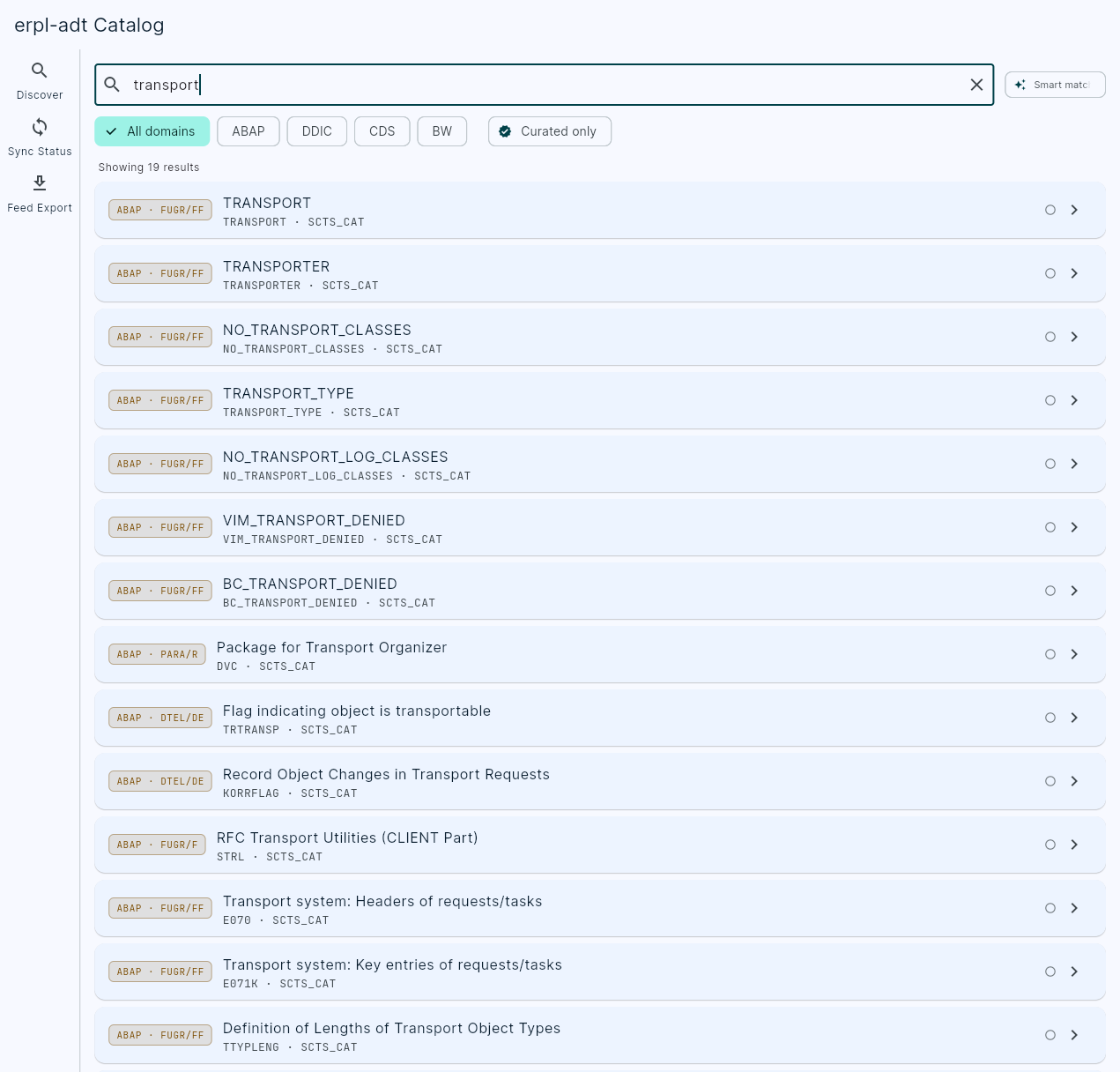
The web UI (a Flutter client compiled and embedded straight into the erpl-adt binary) is read-only against the cache except for curation. Search, Browse, Entity Detail, Lineage, and Driver Tree all query the same fast catalog_* tools the CLI and AI agents use; the Curate screen is the only one that writes, via catalog_annotate.
There is no build/sync button — catalog webui doesn't hold a live SAP connection, so building, exporting, and syncing stay CLI-only operations. Sync Status shows past sync runs and cache health, and Feed Export surfaces the exact erpl-adt catalog build --format … command to run for each format.
Every Explorer view — a search, an entity, a lineage graph, a driver tree — has a stable, copy-pastable URL, so you can share a deep link to exactly what you're looking at.
Serving it to more than yourself
On the default 127.0.0.1 binding there is nothing to configure. Beyond that, catalog webui and mcp --http share one access-control model, described in full in the MCP guide:
# reachable on the LAN by IP — works as-is, an IP has no name to rebind
erpl-adt catalog webui catalog.duckdb --host 0.0.0.0

# reached in a browser by a DNS name — name it, or the browser is refused with 403
erpl-adt catalog webui catalog.duckdb --host 0.0.0.0 --allowed-hosts catalog.internal.example

# and require a token, since the Curate screen writes through catalog_annotate
erpl-adt catalog webui catalog.duckdb --host 0.0.0.0 \
    --allowed-hosts catalog.internal.example --auth-token-env ERPL_ADT_WEBUI_TOKEN
Binding beyond loopback without a token exposes the catalog API — including those curation writes — to everyone who can reach the port.
Catalog MCP tools
When you start the MCP server with --catalog-db, the catalog_* tools are available to the agent alongside the live ADT tools:
| MCP tool | What it does |
|---|---|
catalog_search | Hybrid (full-text + semantic) search over the cache |
catalog_get | Fetch a single entity by id, with fields and overlay |
catalog_lineage | Upstream/downstream lineage for an entity |
catalog_where_used | Reverse dependencies — what references this entity |
catalog_driver_tree | Expand an entity's driver tree |
catalog_object_types / catalog_object_subtypes | Enumerate the type/subtype facets present in the cache |
catalog_stats | Cache size, counts, and coverage |
catalog_sync_status | Last sync runs and cache health |
catalog_annotate | Write a business-overlay annotation (the only writing tool) |
catalog_build / catalog_export | Build the feed / export it in a chosen format |
See the MCP guide for client wiring.
Where to next
- MCP Server — wire the
catalog_*tools into Claude Code, Cursor, or Gemini - Command Reference — every
catalogflag - BW/4HANA Modeling — the BW objects the catalog stitches lineage across