An AI Agent That Calls Live SAP Data — and Fixes It in ABAP

← Part 1: Your SAP Data Is Already Real-Time
In Part 1, a mid-size manufacturer's forecasting team got a live, validated, DuckDB-native view of their SAP order and customer data — fresh within five minutes, anomalies caught at the gate, no warehouse in the middle.
This post is Part 2. It answers the next two questions: how does the AI agent actually reach that data, and what happens when the data is wrong?
The short version: we publish the view as a REST endpoint and an MCP tool with flAPI so the agent can call it, and when the agent finds a bad number it reads the ABAP behind the view, writes a patch, and files a transport with erpl-adt.
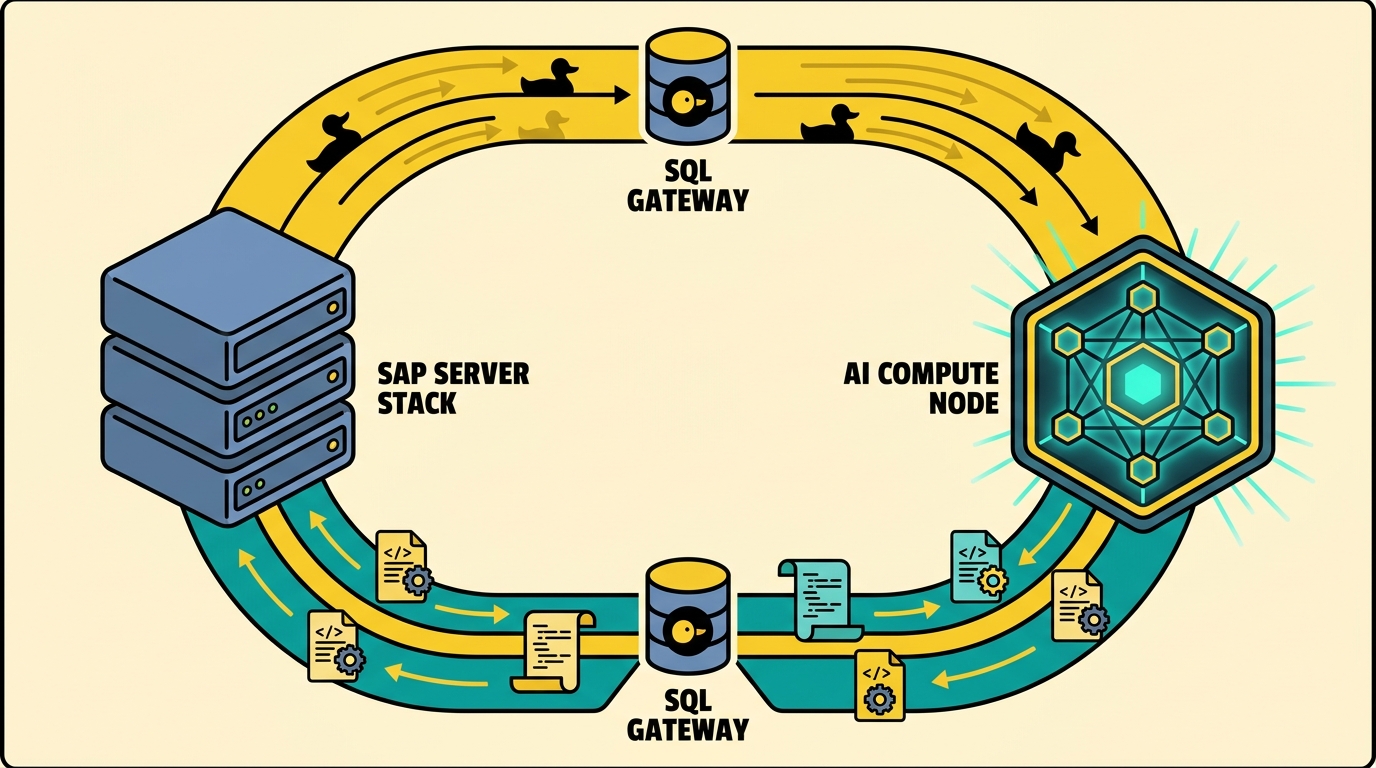
The forecasting agent isn't a Python notebook anymore — it's an LLM the operations team talks to in plain English. That's what forces both halves. It can't be batch-fed a file; it has to call the data through an interface. And when it finds a wrong number, the operations team wants it to fix the source, not just flag it. Here's how each half works.
flAPI: one SQL template, two surfaces
We built flAPI for exactly this moment. It compiles a single Mustache-templated SQL snippet into two consumer surfaces at the same time: a REST endpoint that the dashboard team can hit, and an MCP tool that the agent can call. Same SQL, same parameter validation, same cache.
The endpoint that mattered to the forecasting team was "high-anomaly customers, optionally filtered by segment, optionally filtered by date". Here's the configuration. The SQL template lives in customers-with-anomalies.sql; the YAML describes how that template becomes an API:
# customers-rest.yaml
url-path: /customers/anomalies

request:
  - field-name: segment
    field-in: query
    description: Customer market segment
    required: false
    validators:
      - type: enum
        allowedValues: [AUTOMOBILE, BUILDING, FURNITURE, HOUSEHOLD, MACHINERY]
  - field-name: since
    field-in: query
    description: Earliest order date
    required: false
    validators:
      - type: date
        min: "2024-01-01"

connection: erpl_sap_prod
template-source: customers-with-anomalies.sql

with-pagination: true

cache:
  enabled: true
  table: customers_anomalies_cache
  schema: analytics
  schedule: 5m
  primary-key: [customer_id]
  cursor:
    column: last_seen
    type: timestamp
The companion MCP tool file is half the size, and it shares the same template:
# customers-mcp-tool.yaml
mcp-tool:
  name: customer_anomalies
  description: |
    Return customer accounts with recent anomalous order behaviour.
    Use this to investigate forecasting outliers.
  result-mime-type: application/json

{{include:request from customers-rest.yaml}}
connection: erpl_sap_prod
template-source: customers-with-anomalies.sql
DuckLake caches the materialised result for five minutes; the underlying SQL is the same view we built in Part 1. The REST clients see paginated JSON. The MCP clients see a typed tool. Nobody has to write the query twice.

The agent calls the tool
With the flAPI MCP server registered, the agent's view of SAP is a list of named tools, each with a schema describing its parameters and result type. From the agent's side, the conversation is unremarkable — exactly the goal:
Operations lead: Which customers had unusual ordering behaviour in the last week?
Agent: (calls
customer_anomalies(since="2026-05-22")via MCP) Twelve accounts came back with non-trivial anomaly scores. Eleven look like legitimate one-off events — bulk orders for trade fairs, a new construction project. One looks systemic: customer 100482 has a recurring anomaly every Monday morning at 06:14, and the affected rows all carrykdgrp = 9999, which isn't one of your real pricing groups.
The agent didn't ingest a CSV. It didn't load a Python kernel. It called a typed tool and read JSON. The data was four minutes old.
The plot twist: same anomaly, every Monday
Operations could have stopped there. They didn't. The data steward asked the agent to look harder, and the agent — having read both Part 1's anofox-tabular query and the flAPI tool schema — formed a hypothesis.
Agent: The Monday-06:14 timing suggests a scheduled batch job. The pricing group
9999is consistent across all affected rows, which is consistent with a default-value assignment in ABAP code. Want me to look?
What happens next is the part most "SAP plus AI" articles never reach. The agent is connected to a second MCP server — erpl-adt. That gives it tools to read, modify, and activate ABAP source on the live SAP system. The MCP client config is three lines:
{
  "mcpServers": {
    "sap_data":    { "command": "flapi", "args": ["serve", "--mcp", "--config", "flapi.yaml"] },
    "sap_abap":    {
      "command": "erpl-adt",
      "args": ["mcp", "--host", "sap-prod.example.com", "--port", "44300", "--https"],
      "env": { "SAP_PASSWORD": "${SAP_PASSWORD}" }
    }
  }
}
The forecasting agent now has two surfaces: one to read business data (flAPI), one to read and modify business logic (erpl-adt). It also has the safety property we cared about most: it can only do what an actual SAP user could do, governed by the same authorizations.
erpl-adt: the agent reads ABAP
The agent's first move was the same one a human developer would make: search for the scheduled job that runs on Mondays.
# In the agent's tool-use trace, these are MCP tool calls;
# we show the equivalent CLI for clarity.
erpl-adt search "*MONDAY*" --type PROG --max 20
erpl-adt search "PRICING_GROUP_DEFAULT" --max 20
Search returns a handful of programs and one include. The agent grabs the source:
erpl-adt source read \
  /sap/bc/adt/programs/programs/zr_weekly_price_seed/source/main
The offending include is small. Halfway down, a line that doesn't belong:
" Fallback to placeholder when customer's pricing group is empty.
" TODO(rb): remove after 2019 migration is finished.
IF lv_kdgrp IS INITIAL.
  lv_kdgrp = '9999'.
ENDIF.
Seven years of inertia. The agent proposes the obvious change — read the customer's real pricing group from KNVV instead of defaulting — drafts the patched ABAP, and asks for approval. The operations lead says yes.
What the agent does next is the bit we want every reader to imagine doing on their own systems:
# 1. Write the patched source. Lock + write + unlock is atomic;
#    --activate folds in the activation step.
erpl-adt source write \
  /sap/bc/adt/programs/programs/zr_weekly_price_seed/source/main \
  --file patched.abap \
  --activate

# 2. Run the ABAP Unit tests that cover the include.
erpl-adt test ZR_WEEKLY_PRICE_SEED

# 3. Run ATC quality checks against the team's variant.
erpl-adt check ZR_WEEKLY_PRICE_SEED --variant DEFAULT

# 4. Create a transport with a sensible description.
erpl-adt transport create \
  --desc "Remove 2019 kdgrp=9999 fallback; read from KNVV instead" \
  --package ZFI_PRICING
Every one of those commands is a real MCP tool the agent invoked. Every one returned structured JSON the agent could reason about. The transport landed in the operations lead's request list with the agent's description attached — for review and release by a human.
Closing the loop
The next Monday morning, the flAPI dashboard for customer 100482 was empty. So were the rest of the systemic anomalies. The agent's tool call returned the same JSON shape it always had; the underlying SAP data simply no longer contained the bad rows the agent had been pointing at, because the ABAP job that wrote them was gone.
This is the architecture, drawn as a loop:
- SAP holds the ledger of record.
- ERPL and ERPL-Web stream from it into DuckDB.
- anofox-tabular filters out the rows that shouldn't reach the model.
- flAPI publishes the clean view as REST and MCP.
- The agent reads it, reasons about it, and — when it finds a problem — uses erpl-adt to fix the source.
No warehouse landed any data. No Eclipse session was open. No JVM ran. Every step happened in the agent's own MCP-driven tool loop, governed by real SAP authorizations.
Why this matters
Most of the "SAP + AI" stories shipping today stop at retrieval-augmented generation: the model reads SAP data and produces a text answer. That's table stakes now. The interesting frontier is whether the model can change SAP — read ABAP, propose a patch, run tests, file a transport, and hand a reviewable artifact back to a human.
The forecasting team got both. The dashboards run on a four-minute-fresh view of orders and customers. The agent answers operations questions in plain English. And once a week, on average, the agent files a transport that fixes something nobody had noticed.
That's the stack we wanted from the beginning. DuckDB-native, secret-managed, no warehouse, no JVM, no Eclipse. Just SQL on one side, an LLM on the other, and a closed loop in the middle.
If you want to build it yourself, the docs start here for ERPL, here for flAPI's MCP mode, and here for erpl-adt. If you want us to help, book a demo.