Reach On-Prem Postgres and SAP from a Cloud Container — Without Opening a Port

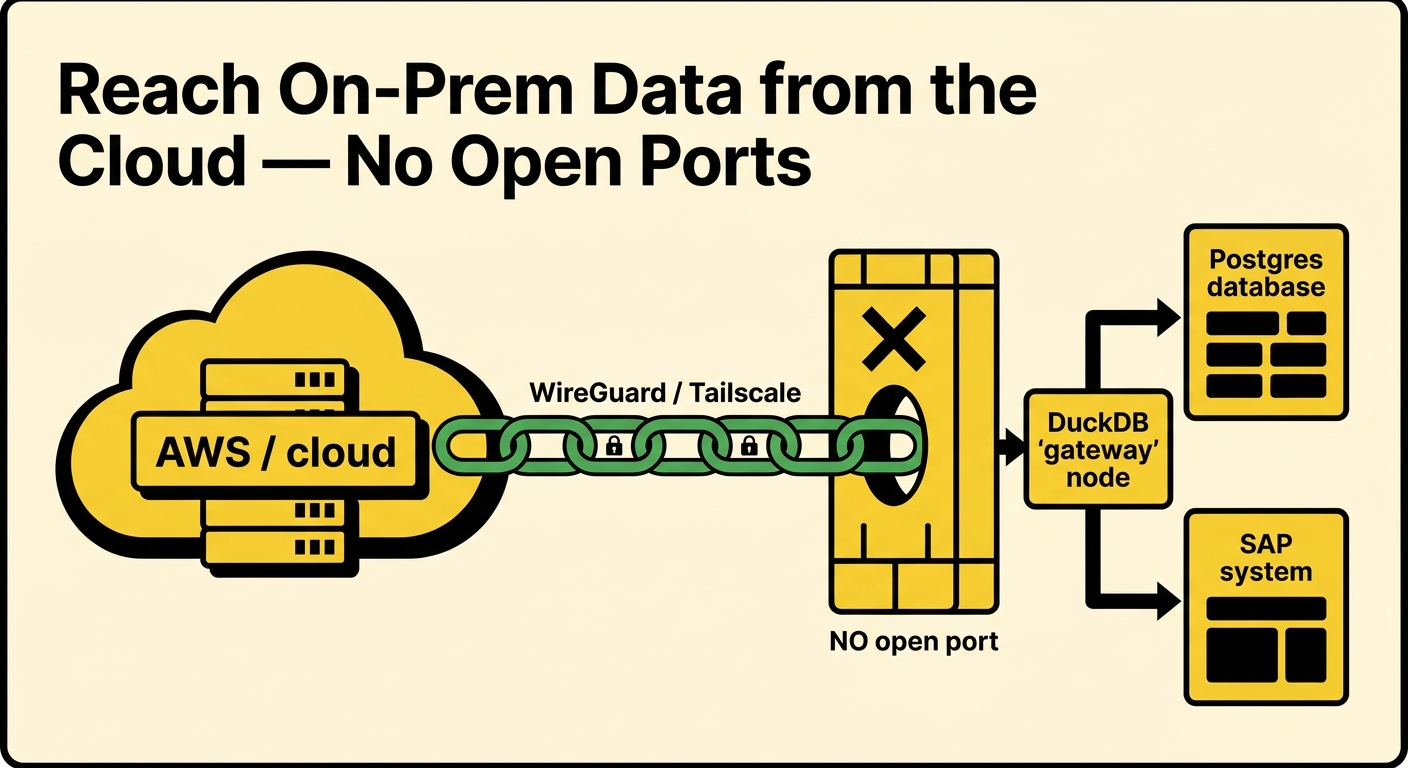
Here is a problem that shows up on every hybrid-cloud project eventually. You have a container in the cloud — an AWS ECS task, a Fargate job, an analytics or AI workload — and it needs data that lives in an on-prem network: a Postgres database, or an SAP system reachable only from inside the corporate LAN.
The data is right there. The container just can't reach it. And the moment you ask, the answer from the network team is no: no inbound firewall port to the on-prem network, no public IP on the database, no exception. That's not obstruction — it's the correct default. An open port into your ERP network is exactly what you don't want.
So the usual workarounds start: a site-to-site VPN, a bastion host with SSH port-forwards, an IP allowlist someone has to maintain, a reverse proxy in a DMZ. Each one is a standing piece of infrastructure, and each one is a thing that can be misconfigured into an open door.
There's a smaller way to do this, and it doesn't open a port at all.
The shape of the fix
Put one DuckDB process on-prem — call it the gateway. It already has what the cloud container lacks: a network route to the database and the credentials to use it. Now do two things to it:
- Publish a curated view over quack, the DuckDB remote-protocol extension. A peer can then
ATTACHthis DuckDB and run SQL against it, as if it were a local database. - Join a Tailscale tailnet with
erpl_tunnel, our DuckDB extension that runs an in-processtsnetnode — notailscaled, no root, no kernel TUN. It publishes the quack port onto the tailnet.
The cloud container joins the same tailnet and attaches to the gateway by its tailnet address. The SQL executes on the gateway, next to the data, and only the result crosses the network.
The reason no port opens is the whole point of a mesh VPN like Tailscale: both nodes make outbound connections to the coordination plane, and WireGuard traverses the NAT between them. The on-prem network never accepts an inbound connection from the internet. (Tailscale's own "How Tailscale works" is the best explanation of the mechanism.) erpl_tunnel embeds Tailscale's tsnet library, so the whole node lives inside the DuckDB extension — nothing to install on the host.
Install
On both machines — the on-prem gateway and the cloud container:
INSTALL erpl_tunnel FROM 'http://get.erpl.io';
LOAD erpl_tunnel;
INSTALL quack;   LOAD quack;
erpl_tunnel is self-distributed today, so start DuckDB with -unsigned (the community-extensions submission that removes that requirement is in progress). Everything below is plain SQL.
You'll also need a Tailscale auth key — one per node. Generate it reusable and ephemeral so nodes clean themselves up when the process exits; the erpl_tunnel Tailscale guide walks through the options.
On-prem: the gateway
The gateway attaches Postgres with DuckDB's postgres extension, then publishes exactly what it wants to share as a view. The view is the contract: it pins the table, the columns, and any filter, and — because the SQL runs here — the predicate pushes down into Postgres.
-- Reach the local Postgres (localhost to this gateway; nothing is exposed yet)
ATTACH 'host=127.0.0.1 port=5432 dbname=erp user=erp_ro password=…'
    AS pg (TYPE postgres, READ_ONLY);

-- Share a view, not raw access:
CREATE VIEW sales AS
    SELECT id, customer, region, amount, created
    FROM pg.public.sales_order;
Now serve it over quack and publish that port onto the tailnet:
CALL quack_serve('quack:127.0.0.1:9494',
    token => 'a-long-shared-token', allow_other_hostname => true);

CREATE SECRET ts (TYPE tunnel, backend 'tailscale',
    auth_key 'tskey-auth-…', hostname 'duckdb-onprem-gw', ephemeral true);
PRAGMA tunnel_export(secret = 'ts', local_port = 9494);

SELECT mesh_ip FROM tunnel_self(secret = 'ts');   -- the address to hand the cloud container
quack_serve binds 127.0.0.1; tunnel_export is what makes it reachable — but only to peers on your tailnet, and only outbound. No listener faces the internet.
In the cloud: the AWS container
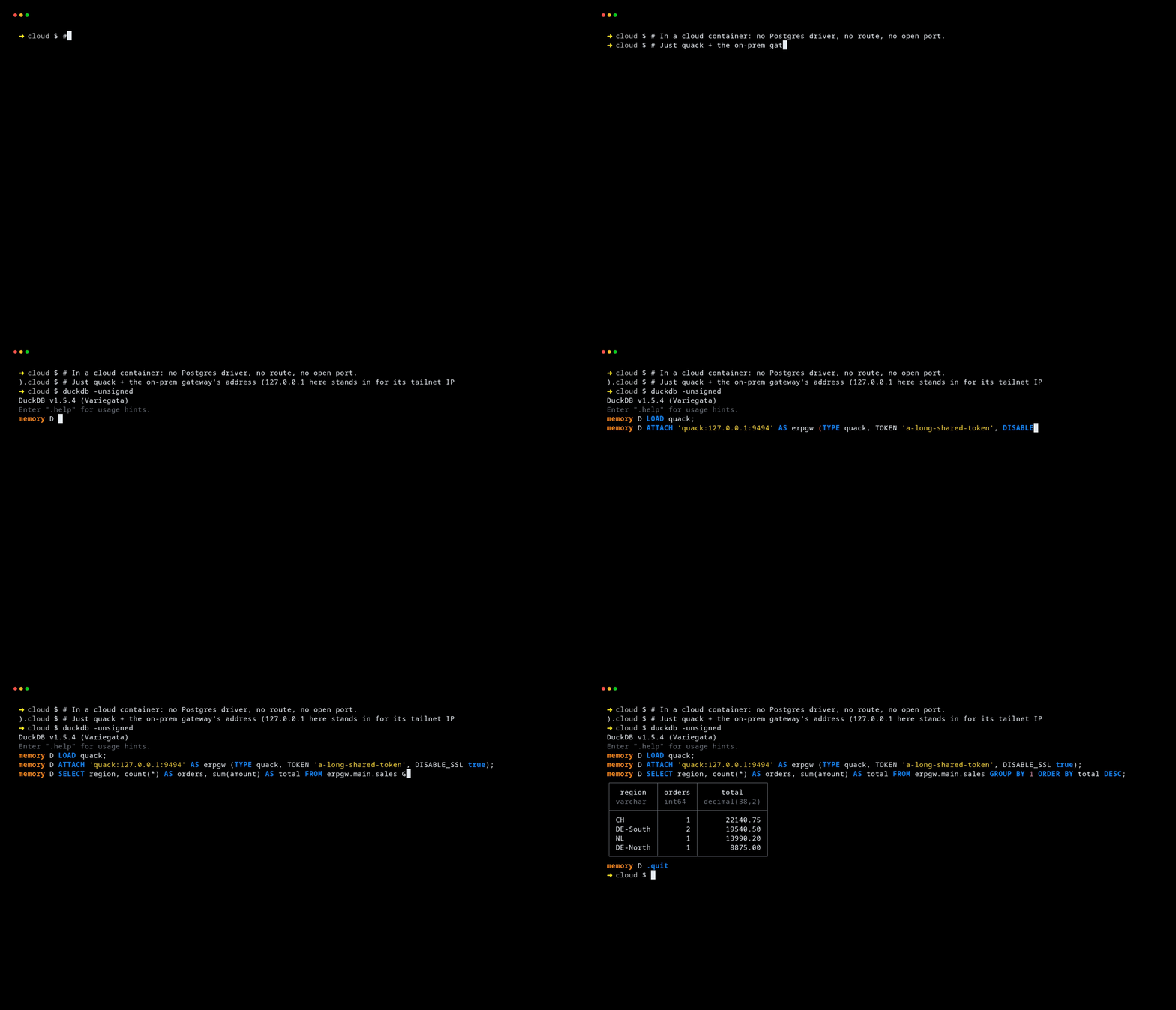
The container joins the same tailnet and attaches to the gateway by its 100.x tailnet address. It has no Postgres credentials, no route to the on-prem network, and no database driver — just quack and the shared token:
LOAD quack;
ATTACH 'quack:100.x.y.z:9494' AS erpgw (TYPE quack,
    TOKEN 'a-long-shared-token', DISABLE_SSL true);

SELECT region, count(*) AS orders, sum(amount) AS total
FROM erpgw.main.sales
GROUP BY 1 ORDER BY total DESC;
┌──────────┬────────┬──────────┐
│  region  │ orders │  total   │
├──────────┼────────┼──────────┤
│ CH       │      1 │ 22140.75 │
│ DE-South │      2 │ 19540.50 │
│ NL       │      1 │ 13990.20 │
│ DE-North │      1 │  8875.00 │
└──────────┴────────┴──────────┘
That GROUP BY ran on the gateway, next to Postgres — only the four grouped rows crossed the link, not the raw orders. You can join on-prem data against something local to the container, too, and DuckDB pulls across only what it needs:
SELECT s.region, s.total, t.target
FROM (SELECT region, sum(amount) AS total FROM erpgw.main.sales GROUP BY 1) s
JOIN read_csv_auto('targets.csv') t USING (region);
DISABLE_SSL true is required, not a shortcut: the quack client defaults to HTTPS for a non-local address, and WireGuard already encrypts the hop.
(The output above is real — I ran the gateway and client as two separate DuckDB processes against a Postgres container. In the walkthrough they talk over 127.0.0.1; on a real deployment the only change is the address in the ATTACH — the gateway's tailnet IP instead of localhost.)
The same shape reaches SAP
Swap Postgres for SAP and nothing structural changes. SAP access is usually pinned to one machine anyway — the one with the NetWeaver RFC SDK, the service account, and a route to the system. That machine becomes the gateway. Load erpl for SAP, publish views, and export exactly as before:
INSTALL 'erpl' FROM 'http://get.erpl.io'; LOAD 'erpl';
CREATE SECRET sap (TYPE sap_rfc, ASHOST 'sap.internal', SYSNR '00',
    CLIENT '100', USER 'DEVELOPER', PASSWD '…', LANG 'EN');

-- Push the filter into SAP; only matching rows are read:
CREATE VIEW lh_flights AS
    SELECT * FROM sap_read_table('SFLIGHT',
        COLUMNS=['CARRID','CONNID','FLDATE','PRICE'],
        FILTER='CARRID = ''LH''', SECRET='sap');

CALL quack_serve('quack:127.0.0.1:9494', token => '…', allow_other_hostname => true);
PRAGMA tunnel_export(secret = 'ts', local_port = 9494);
The cloud container queries sapgw.main.lh_flights the same way it queried sales. The SAP round trip happens next to SAP; the container never sees the SDK, the credentials, or the SAP network. (The erpl suite exposes SAP over RFC, ODP, and OData — the erpl blog has the deeper stories; here it's just another source behind the gateway.)
Two independent controls, and nothing leaks
What makes this comfortable to run in production is that access is governed by two separate things that don't overlap:
- The tailnet ACL decides who can reach the gateway node at all. A container that isn't on the tailnet, or that the ACL doesn't permit, cannot open the connection — before any token or query.
- The views decide what a permitted peer can see.
erpgw.main.salesis the only surface; the peer cannot reachpg.*or run arbitrary SQL against the raw tables.
On top of that: the database and SAP credentials never leave the gateway, the driver and SDK are installed once, the local listener binds 127.0.0.1, and every secret field is redacted in duckdb_secrets(). Ephemeral tailnet nodes disappear when the process exits, so a finished Fargate task leaves nothing behind on your machine list.
What it replaces
No VPN client, no bastion, no reverse proxy, no inbound firewall rule — and no data pipeline copying the whole table to the cloud just so a container can read a slice of it. One DuckDB on-prem, one on the container, a shared token, and a tailnet.
INSTALL erpl_tunnel FROM 'http://get.erpl.io';
LOAD erpl_tunnel;
erpl_tunnel is open on GitHub, speaks SSH and NetBird as well as Tailscale, and is part of the erpl SAP family by DataZoo. The Tailscale and security guides have the full walkthrough, including running your own control plane with Headscale.