Read and Write SAP IDoc Files as SQL Tables in DuckDB

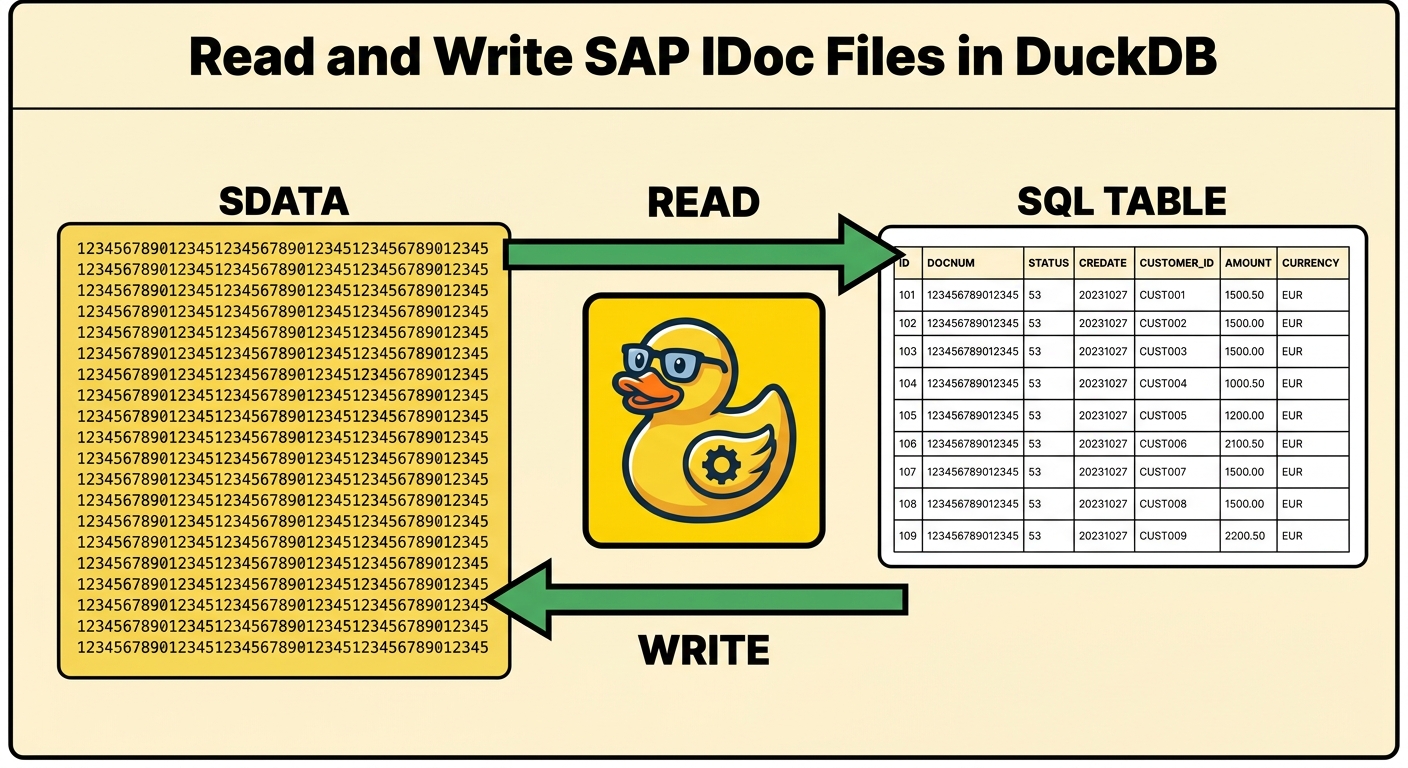
If you have ever worked an SAP EDI or ALE interface, you have seen an IDoc file: a flat text file where every line is exactly 1063 characters, and the payload — the field called SDATA — is a 1000-character run with no delimiters. No commas, no tags, no header. Just a fixed-width blob whose meaning lives in a segment definition inside SAP.
That's the problem. To read what's actually in an IDoc you open SAP: transaction WE60 for the segment layout, WE02 to look at the document. Outside SAP, an IDoc file is opaque. You can't grep it in any useful way, you can't load it into a warehouse, and you certainly can't diff two of them field by field.
erpl_idoc is a DuckDB extension that fixes that. It reads IDoc files as SQL tables, decodes the SDATA blob into typed columns, writes byte-valid IDocs back out from a query, and converts flat ⇄ IDoc-XML — all in plain SQL, and all offline. No SAP connection, no RFC libraries, no middleware.
And it goes both ways. The same extension that lands an inbound file as a table also produces an outbound one: compose the records in SQL, COPY them to disk, and you get a byte-valid IDoc a SAP file-port will accept. Read and write, on one file engine.

Install
It's a DuckDB Community Extension:
INSTALL erpl_idoc FROM community;
LOAD erpl_idoc;
That's the whole setup. Nothing else to install, and nothing to connect to.
Read an IDoc as a table
The generic reader gives you one row per data record — the segment name, its place in the hierarchy, and the raw payload:
SELECT segnam, hlevel, length(sdata) AS sdata_len
FROM sap_idoc_read('booking.idoc');
┌────────────┬────────┬───────────┐
│   segnam   │ hlevel │ sdata_len │
├────────────┼────────┼───────────┤
│ E1BPSBONEW │ 01     │      1000  │
└────────────┴────────┴───────────┘
You get the structure for free — segment names, hierarchy levels — but the actual content is still that 1000-character SDATA field. Ask to see it and you get exactly what makes IDocs painful:
SELECT substr(sdata, 1, 48) AS sdata_head FROM sap_idoc_read('booking.idoc');
LH 04002026071500000042Y MUELLER
An airline code, a flight date, a customer number, a passenger name — all packed together with no separators. Readable only if you know where each field starts and how long it is.
Decode SDATA into typed columns
That "where each field starts" is a segment dictionary: a small table of field_name, offset, length, datatype for each segment. Point sap_idoc_read_segment at one, and the blob becomes columns:
SELECT airlineid, connectid, flightdate, customerid, class, passname
FROM sap_idoc_read_segment('booking.idoc', 'E1BPSBONEW', 'flightbooking.dict.csv');
┌───────────┬───────────┬────────────┬────────────┬───────┬──────────┐
│ airlineid │ connectid │ flightdate │ customerid │ class │ passname │
├───────────┼───────────┼────────────┼────────────┼───────┼──────────┤
│ LH        │ 0400      │ 20260715   │ 00000042   │ Y     │ MUELLER  │
└───────────┴───────────┴────────────┴────────────┴───────┴──────────┘
Same bytes, now legible. The dictionary is just a relation — a CSV, a Parquet file, a table, or a view — so its origin doesn't matter to the parser. You can hand-author one from field order and width (sap_idoc_dict_offsets computes the offsets, sap_idoc_dict_validate checks it), or fetch it from a live system once and persist it to Parquet for reuse. More on that below.
The control record, typed
Every IDoc opens with a control record — the EDI_DC40 envelope that says what the document is and who it's between. erpl_idoc reads all 36 of its fields as typed columns:
SELECT idoctyp, mestyp, sndprn, rcvprn
FROM sap_idoc_read_control('booking.idoc');
┌───────────────────────────────┬─────────────────────────────┬────────────┬────────────┐
│            idoctyp            │           mestyp            │   sndprn   │   rcvprn   │
├───────────────────────────────┼─────────────────────────────┼────────────┼────────────┤
│ FLIGHTBOOKING_CREATEFROMDAT01 │ FLIGHTBOOKING_CREATEFROMDAT │ A4HCLNT001 │ A4HCLNT001 │
└───────────────────────────────┴─────────────────────────────┴────────────┴────────────┘
Write byte-valid IDocs from SQL
Reading is half of it. The booking.idoc above wasn't a file I had lying around — I built it from a query. You compose the fixed-width payload with the encoders and write the file with COPY … (FORMAT sap_idoc):
COPY (
  SELECT sap_idoc_encode_data_record(
    'E1BPSBONEW', '001', 1, 1, 0, 1,
    sap_idoc_encode_sdata(
      [0, 3, 7, 15, 23, 40],                 -- field offsets
      [3, 4, 8,  8,  1, 25],                 -- field lengths
      ['LH','0400','20260715','00000042','Y','MUELLER']))
) TO 'booking.idoc' (FORMAT sap_idoc);
The writer does the fussy parts for you: it packs each value into its fixed-width slot and recomputes the derived fields SAP expects — record numbers (SEGNUM), parent pointers (PSGNUM), hierarchy level (HLEVEL), and lengths. The result is a file a SAP file-port will accept.
And the round trip is exact. Read a file's raw records and write them straight back, and you get the input byte-for-byte:
COPY (SELECT raw_record FROM sap_idoc_read_raw('orders.idoc') ORDER BY record_index)
  TO 'copy.idoc' (FORMAT sap_idoc);
$ cmp orders.idoc copy.idoc && echo "identical"
identical
Byte-exact matters more than it sounds. It means the transform is lossless — nothing about the original was thrown away and re-guessed — so you can put erpl_idoc in the middle of a real interface and trust that what comes out is what SAP produced.
Convert flat ⇄ IDoc-XML
IDocs come in two serializations: the fixed-width flat file, and the self-describing IDoc-XML that newer ports prefer. erpl_idoc converts between them losslessly:
SELECT xml FROM sap_idoc_to_xml('adrmas.idoc', 'adrmas.dict.csv');
<?xml version="1.0" encoding="utf-8"?>
<ADRMAS03>
  <IDOC BEGIN="1">
    <EDI_DC40 SEGMENT="1">
      <TABNAM>EDI_DC40</TABNAM>
      <IDOCTYP>ADRMAS03</IDOCTYP>
      <MESTYP>ADRMAS</MESTYP>
      <SNDPOR>SAPA4H</SNDPOR>
      ...
flat → xml → flat reproduces the original file exactly, so you can switch a port's format without touching the payload.
It's quick, too
The reader is streaming and parallel — each file is parsed record-by-record in constant memory, and a glob or list of files is read one thread per file. A 100 MB IDoc file with 10,000 documents and 90,000 records counts in about 0.15 seconds on my laptop, start to finish:
SELECT count(*) FROM sap_idoc_read('inbox/*.idoc');
Every reader takes a single path, a glob, or a list, resolved through DuckDB's virtual filesystem — so a whole landing directory works, including s3://, http(s)://, and gs:// once httpfs is loaded.
The offline part is the point
Notice what didn't happen in any of the queries above: a connection to SAP. erpl_idoc links no SAP libraries and makes no network calls. The one thing it needs for typed decode is the segment dictionary, and that's just a file.
So the pattern that makes it useful on a locked-down or air-gapped host is: fetch the dictionary once from a connected system, persist it, then decode forever offline. When erpl_rfc — the RFC extension in the same erpl family — is available, that fetch is a one-liner:
-- on a connected machine, once:
COPY (SELECT * FROM sap_idoc_dictionary(sap_idoc_params('ORDERS05')))
     TO 'orders.dict.parquet' (FORMAT parquet);
-- on a SAP-less machine, forever after — only erpl_idoc + the file:
SELECT * FROM sap_idoc_read_segment('po_4711.idoc', 'E1EDK01', 'orders.dict.parquet');
That's the same "extract the metadata once, then work detached" shape the rest of the erpl tooling follows. erpl_idoc is the document layer of it — the piece that turns SAP's EDI files into something a warehouse, a script, or a notebook can read. It composes with erpl_rfc when you want a live round trip, but on its own it stays a pure, portable file engine.
Where it fits
If you land inbound IDocs in a warehouse, decode opaque ALE payloads, produce outbound IDocs from transformed data, or migrate a flat interface to XML — that used to mean middleware or ABAP. Now it's a SELECT.
INSTALL erpl_idoc FROM community;
LOAD erpl_idoc;
The extension is open on GitHub, documented function-by-function (SELECT * FROM duckdb_functions() WHERE function_name LIKE 'sap_idoc_%' prints a description and example for each), and part of the erpl SAP family by DataZoo. Found a segment it doesn't decode cleanly? Open an issue — the engineering norm here is a byte-exact round trip against a real SAP system, no mocks.